README.md
🔊 Multi Audio Sink (mas)
Play audio through multiple devices at once on Linux — without memorizing PipeWire commands.
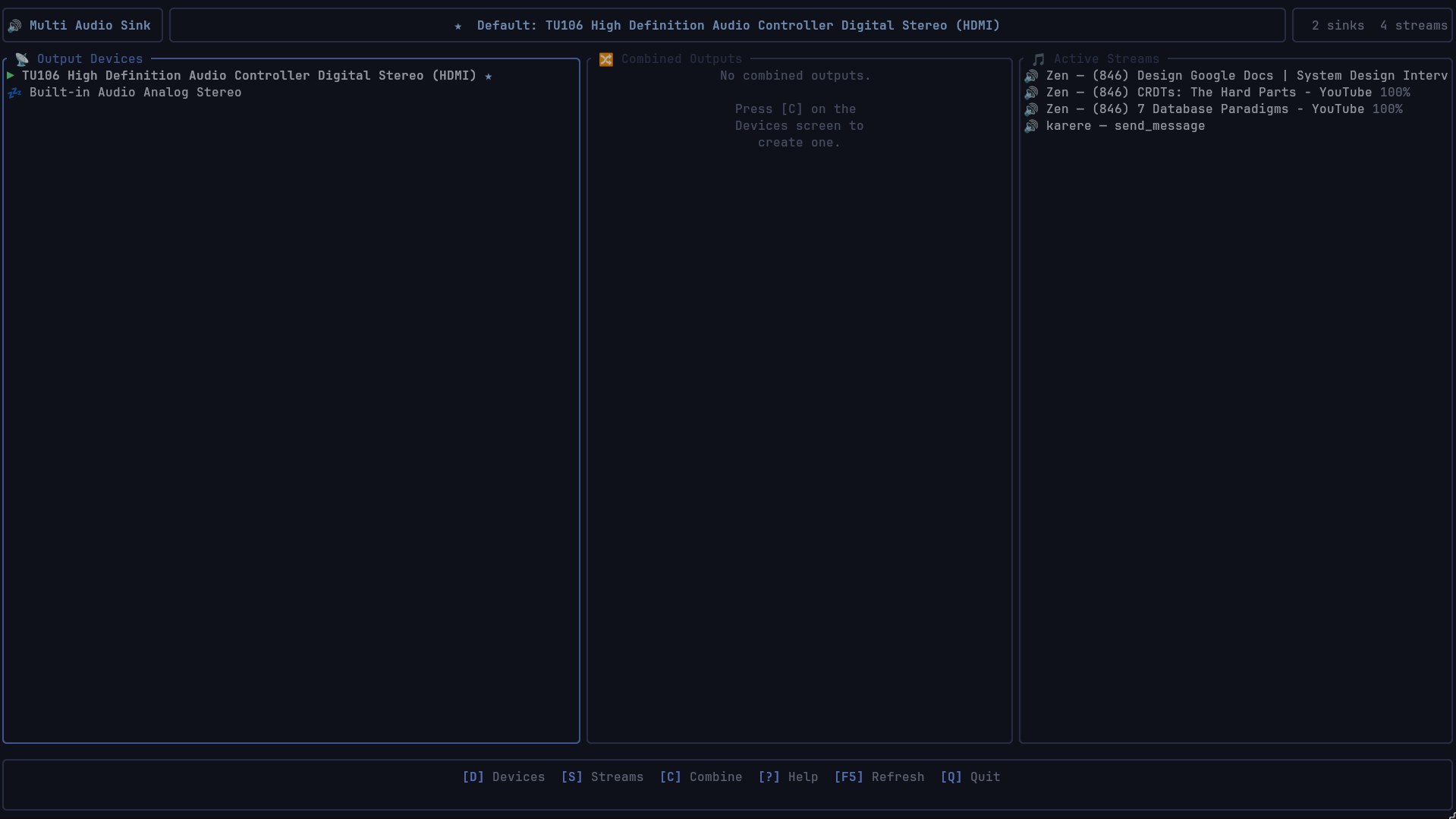
Multi Audio Sink (mas) is a human-friendly terminal UI for PipeWire and PulseAudio that makes multi-output audio simple.
Route sound to Bluetooth headphones, speakers, HDMI monitors, AUX devices, and virtual sinks simultaneously from a clean, keyboard-driven interface built for real-world Linux desktop use.
Unlike traditional Linux audio tools that focus on low-level patch graphs or mixers, mas is designed around one primary goal:
Combine outputs. Switch them instantly. Control everything from one place.



Why Multi Audio Sink?
Linux audio routing is powerful — but usually inconvenient.
Want audio on:
- Bluetooth headphones + speakers?
- HDMI monitor + AUX headset?
- Multiple devices simultaneously?
- Different applications mapped to different outputs so multiple people can watch and listen to different things at the same time?
Normally that means:
- remembering
pactlcommands - manually creating combined sinks
- moving streams by hand
- debugging suspended Bluetooth devices
- restarting applications
mas removes all of that. Everything is discoverable, interactive, and built around fast everyday workflows.
What makes it different?
🎯 Multi-output audio is the core feature
Most Linux audio tools are mixers, patchbays, or PipeWire graph explorers. mas is specifically designed for:
- combining multiple outputs
- switching sinks instantly
- moving applications between outputs
- managing Bluetooth + wired devices together
- making complex audio routing feel incredibly simple
⚡ Designed for humans, not audio engineers
You should never need to memorize pactl load-module module-combine-sink ... again. mas provides guided workflows and clear actions. The interface is built around clarity, recovery, and confidence.
🚀 What you can do
| Task | Multi Audio Sink (mas) |
|---|---|
| Combine multiple audio outputs | ✅ |
| Play audio on Bluetooth + AUX simultaneously | ✅ |
| Map distinct audio sessions to different devices so multiple people can use it | ✅ |
| Switch default sinks instantly | ✅ |
| Move running applications between outputs | ✅ |
| Manage suspended Bluetooth devices | ✅ |
| Clean up stale combined sinks | ✅ |
| Operate entirely from the keyboard | ✅ |
| Memorize PipeWire commands | ❌ |
Core workflows
Combine outputs in seconds
Select multiple devices, create a combined sink, and immediately start playing audio everywhere.
✓ Bluetooth headphones
✓ HDMI monitor
✓ Wired AUX headset

→ Create combined output
→ Set as default
→ Move active apps
Done.
Switch outputs instantly
Quickly move between speakers, headphones, monitors, Bluetooth devices, virtual outputs, and combined sinks without restarting your audio session.
Move running apps without restarting them
Send Firefox, Spotify, Discord, games, or media players to different outputs live. Select the stream, press Enter, and pick the destination output from a quick menu.
Perfect for multi-user setups: Easily map distinct audio sessions to different devices so multiple people can use the same computer simultaneously. You can send a movie's audio to the TV via HDMI while sending a game's audio to your Bluetooth headset—with zero conflict.
Installation (Arch Linux)
From the AUR
The package is officially available on the Arch User Repository! Install it easily with an AUR helper like yay:
yay -S multi-audio-sinkBuild from source
# Install dependencies
sudo pacman -S pipewire pipewire-pulse libpulse cargo git

# Clone repository
git clone https://github.com/sambuaneesh/multi-audio-sink
cd multi-audio-sink

# Build
cargo build --release

# Run
./target/release/mas
Usage
mas                  # Launch normally
mas --debug          # Enable step-by-step debug logging to mas_debug.log
mas --tick-rate 100  # Faster animation (ms)
mas --no-health-check  # Skip pactl connectivity check
mas --help
The interface is fully keyboard-driven and designed to be self-explanatory.
Global Navigation:
| Key | Action |
|---|---|
D | Go to Devices |
S | Go to Streams |
C | Create combined output (Combine Wizard) |
? / F1 | Help screen |
F5 | Refresh audio state |
Q | Quit |
Esc | Go back / cancel |
Device Actions:
| Key | Action |
|---|---|
d | Set as default output |
D | Set as default AND move all streams here |
m | Move all current streams to this device |
r | Resume (unsuspend) this device |
R | Remove this combined output |
Stream Actions:
| Key | Action |
|---|---|
Enter | Move selected stream to a specific output |
M | Move ALL streams to the default output |
Philosophy
mas is not trying to be a DAW, a professional audio patchbay, or a low-level PipeWire graph editor. It exists to solve a practical everyday Linux problem:
"I want audio on multiple devices, and I want it to be easy."
Technical details
- Built with Rust
- Uses
ratatui+crosstermfor a beautiful, responsive TUI - Uses
pactlfor broad PipeWire/PulseAudio compatibility - Works flawlessly on Arch Linux
- Keyboard-first workflow
License
MIT