README.md
Google File System (GFS) Implementation
A simplified implementation of the Google File System in Python, featuring a master server, multiple chunk servers, and a web interface for file operations.
System Architecture
- Master Server: Manages metadata and coordinates chunk servers
- Chunk Servers: Store and serve file chunks with replication
- Client Interface: Web-based interface using Streamlit
- Configuration: TOML-based configuration system
- Logging: Comprehensive logging system with transaction tracking
Directory Structure
gfs/
├── src/
│   ├── __init__.py
│   ├── master.py
│   ├── chunk_server.py
│   ├── client.py
│   ├── file_manager.py
│   ├── chunk.py
│   ├── utils.py
│   └── logger.py
├── interfaces/
│   └── streamlit_app.py
├── configs/
│   └── config.toml
├── data/
│   ├── chunks/
│   └── metadata/
├── logs/
└── requirements.txt
Installation
-
Create a virtual environment:
python -m venv venv source venv/bin/activate # On Windows: venv\Scripts\activate -
Install dependencies:
pip install -r requirements.txt -
Create necessary directories:
mkdir -p data/chunks data/metadata logs
Configuration
The system is configured through configs/config.toml:
[master]
host = "localhost"
port = 5000
chunk_size = 64000000  # 64MB chunks
replication_factor = 3

[chunk_server]
base_port = 5001
data_dir = "data/chunks"
heartbeat_interval = 5  # seconds
server_info_file = "data/chunks/server_info.json"
space_limit_mb = 1024  # Space limit per chunk server in MB

[client]
upload_chunk_size = 64000000
Running the System
1. Start the Master Server
python run_master.pyThe master server will:
- Start on the configured port (default: 5000)
- Manage chunk server registrations
- Handle client requests
- Monitor chunk server health through heartbeats
2. Start Chunk Servers
You can start chunk servers in multiple ways:
-
With a specific ID:
python run_chunk_server.py --id chunk1 -
With a custom config:
python run_chunk_server.py --id chunk1 --config custom_config.toml -
Without an ID (will generate timestamp-based ID):
python run_chunk_server.py
Each chunk server will:
- Auto-assign a port if not previously configured
- Create its own data directory
- Register with the master server
- Send regular heartbeats
- Persist its configuration for restarts
3. Start the Web Interface
streamlit run interfaces/streamlit_app.pyThe web interface provides:
- File upload functionality
- File download capability
- File listing
- Error reporting and status messages
Features
Chunk Server Management
- Persistent chunk server IDs
- Automatic port assignment
- Heartbeat monitoring
- Server information persistence
- Hot-plug capability (add/remove servers)
- Two-phase commit protocol for data consistency
File Operations
- Large file handling with chunking
- Configurable chunk size
- Configurable replication factor
- Automatic chunk distribution
- Record append operations
- Fault tolerance
Transaction Management
- Two-phase commit protocol implementation
- Transaction logging with phases:
- START: Initial transaction setup
- PREPARE: Preparation phase
- COMMIT: Commit phase
- ROLLBACK: Rollback phase
- REPLICATE: Replication phase
- Colored console output for different transaction phases
- Detailed transaction history in log files
Logging System
- Comprehensive logging for all components
- Transaction-specific logging
- Color-coded console output:
- White: Transaction start
- Magenta: Prepare phase
- Blue: Commit phase
- Red: Rollback/Error messages
- Yellow: Replication operations
- Separate log files for each component
- Transaction logs in dedicated directory
Data Consistency
- Two-phase commit protocol ensures:
- All chunk servers prepare successfully before commit
- Atomic commits across all replicas
- Proper rollback on failures
- Transaction logging for recovery
- Primary-based replication chain
- Sequential consistency for writes
Monitoring
- Real-time transaction status in console
- Detailed transaction logs
- Component-specific log files
- Server health monitoring through heartbeats
Background Replication System
The system implements a robust background replication mechanism that ensures data reliability even when there aren't enough chunk servers available initially:
Features
- Dynamic Replication Queue: Tracks chunks that haven't met their replication factor
- Space-Aware Replication: Respects chunk server space limits during replication
- Automatic Recovery: Automatically replicates data when new servers become available
- Persistent Tracking: Maintains pending replication status across system restarts
How it Works
-
Initial Storage
- When a chunk is stored, the system attempts immediate replication
- If insufficient servers are available, the chunk is added to a replication queue
-
Background Processing
- A dedicated background thread monitors the replication queue
- Periodically checks for new available servers
- Attempts to meet replication factor when resources become available
-
New Server Integration
- When new chunk servers join:
- They register with the master server
- The background replication system detects them
- Pending replications are automatically attempted
- Replication status is updated upon success
- When new chunk servers join:
-
Space Management
- Checks available space before replication attempts
- Skips servers with insufficient space
- Maintains space limits specified during chunk server initialization
Configuration
The replication system uses these settings in config.toml:
[master]
replication_factor = 3  # Desired number of replicas per chunk

[chunk_server]
space_limit_mb = 1024  # Space limit per chunk server in MB
Monitoring
The replication status can be monitored through:
- Log files showing replication attempts and status
- Transaction logs tracking replication progress
- Metadata showing current replica count per chunk
- Replication queue status in master server logs
Monitoring
Log Files
Log files are created in the logs/ directory:
master_YYYY-MM-DD.logchunk_server_YYYY-MM-DD.logclient_YYYY-MM-DD.log
Server Information
Chunk server information is stored in:
data/chunks/server_info.json
Metadata
File metadata is stored in:
data/metadata/metadata.json
Customization
Adding New Chunk Servers
-
Start a new chunk server with a unique ID:
python run_chunk_server.py --id custom_name -
The server will automatically:
- Find a free port
- Create its data directory
- Register with the master
- Begin accepting chunks
Custom Configuration
Create a custom config file based on config.toml:
python run_chunk_server.py --id chunk1 --config custom_config.tomlTroubleshooting
-
No chunk servers available
- Ensure at least one chunk server is running
- Check chunk server logs for registration issues
-
Master server connection failed
- Verify master server is running
- Check configured master port
-
Upload/Download failures
- Check available chunk servers
- Verify file permissions in data directories
- Check component logs for specific errors
Development
- Use the logging system for debugging
- Check component logs in the
logs/directory - Monitor
server_info.jsonfor chunk server status - Review
metadata.jsonfor file tracking
Limitations and Missing Features Compared to Real GFS
Architecture Differences
- Partial Dual Phase Commit: Only prepare and commit phases with no lease
- Single Master: No master replication or failover (Real GFS has shadow masters)
- Simplified Chunk Management: Basic chunk allocation without load balancing
- Limited Metadata Operations: No snapshot support
- No Lease Management: Real GFS uses chunk leases for consistency
Missing Features
-
Consistency Model
- Limited consistency guarantees
- No proper two-phase commit protocol
- No atomic record append operations across chunks
- No snapshot functionality
-
Security
- No authentication/authorization
- No encryption (in-transit or at-rest)
-
Advanced Operations
- No snapshot support
- No garbage collection
-
Monitoring and Maintenance
- No monitoring interface
- No diagnostic tools
Future Enhancements
-
High Availability
- Implement shadow masters
-
Data Consistency
- Add lease management
- Implement atomic operations
- Add snapshot support
-
Security
- Add authentication system
- Implement encryption
- Add access control
-
Monitoring
- Add monitoring interface
- Implement diagnostic tools
-
Consistency Improvements
- Add proper lease management
- Implement atomic operations
- Add snapshot support
Implementation Details
Two-Phase Commit Protocol
-
Phase 1 (Prepare)
- Primary receives store/append request
- Primary prepares temporary storage
- Primary coordinates with replicas
- All replicas prepare temporary storage
- Success only if all servers prepare successfully
-
Phase 2 (Commit/Rollback)
- If all prepared: Commit changes on all servers
- If any failed: Rollback all prepared servers
- Update master metadata on successful commit
- Clean up temporary files on rollback
Chunk Management
-
Primary Operations
- Receives client requests
- Coordinates two-phase commit
- Manages replication chain
- Updates master metadata
-
Replica Operations
- Participates in two-phase commit
- Maintains temporary storage
- Handles rollbacks
- Reports status to primary
Location-Aware System Architecture
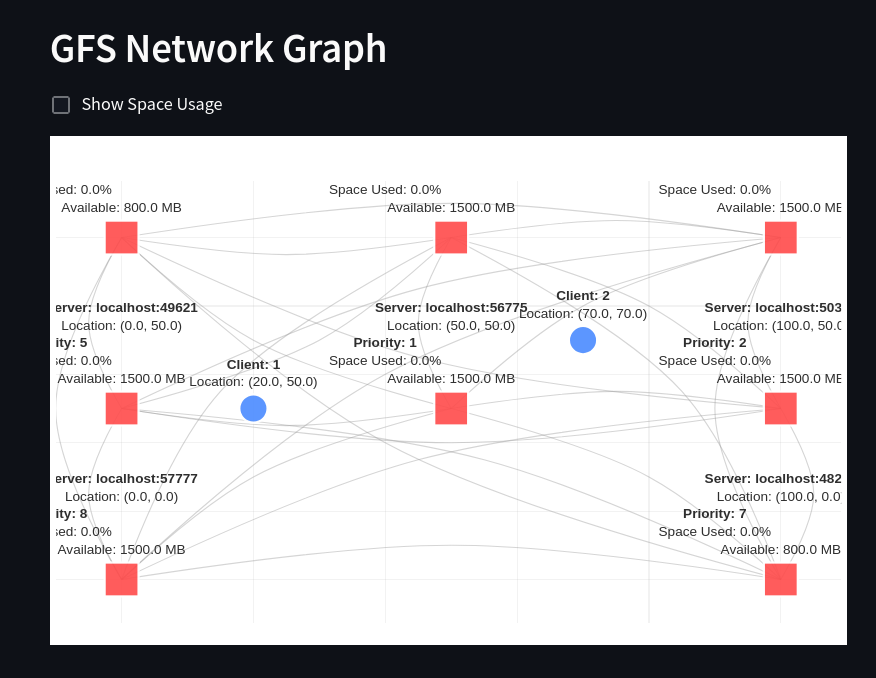
The system now implements a location-aware architecture where chunk servers and clients are positioned in a 2D coordinate space:
Features
- Cartesian coordinate system for nodes
- Distance-based chunk server selection
- Real-time network visualization
- Automatic nearest-server selection
- Space-aware chunk distribution
Running the System
- Start the Master Server:
make master- Start Chunk Servers:
# Format: make chunk <server_id> <x> <y> [space_mb]
make chunk chunk1 10 20 1024  # 1GB space at (10,20)
make chunk chunk2 30 40 2048 # 2GB space at (30,40)- Start Client with Location:
# Format: make client <client_id> <x> <y>
make client client1 15 25  # Client at (15,25)
Web Interface Features
-
File Explorer
- Directory navigation
- File operations:
- Upload
- Download
- Preview
- Create directories
- Path-based navigation
-
Network Graph
- Toggle space usage display
- Server priority visualization
- Real-time statistics
- Auto-refresh option
-
Space Management
- Visual space indicators
- Priority-based allocation
- Dynamic replication
Priority System
The system now uses a sophisticated priority algorithm that considers:
-
Distance Factor (60%)
- Euclidean distance to client
- Normalized by maximum possible distance
-
Space Factor (40%)
- Available space percentage
- Total capacity consideration
- Dynamic updates
Configuration
[master]
replication_factor = 3
distance_weight = 0.6
space_weight = 0.4

[chunk_server]
space_limit_mb = 1024  # Default space limit
heartbeat_interval = 5

[client]
upload_chunk_size = 64000000
Monitoring
- Real-time space usage
- Server priorities per client
- Network topology
- System statistics
- Client-server relationships